> ## Documentation Index
> Fetch the complete documentation index at: https://developers.agentx.so/llms.txt
> Use this file to discover all available pages before exploring further.
# Playground
> Test prompts, models, and tools against real dataset cases interactively
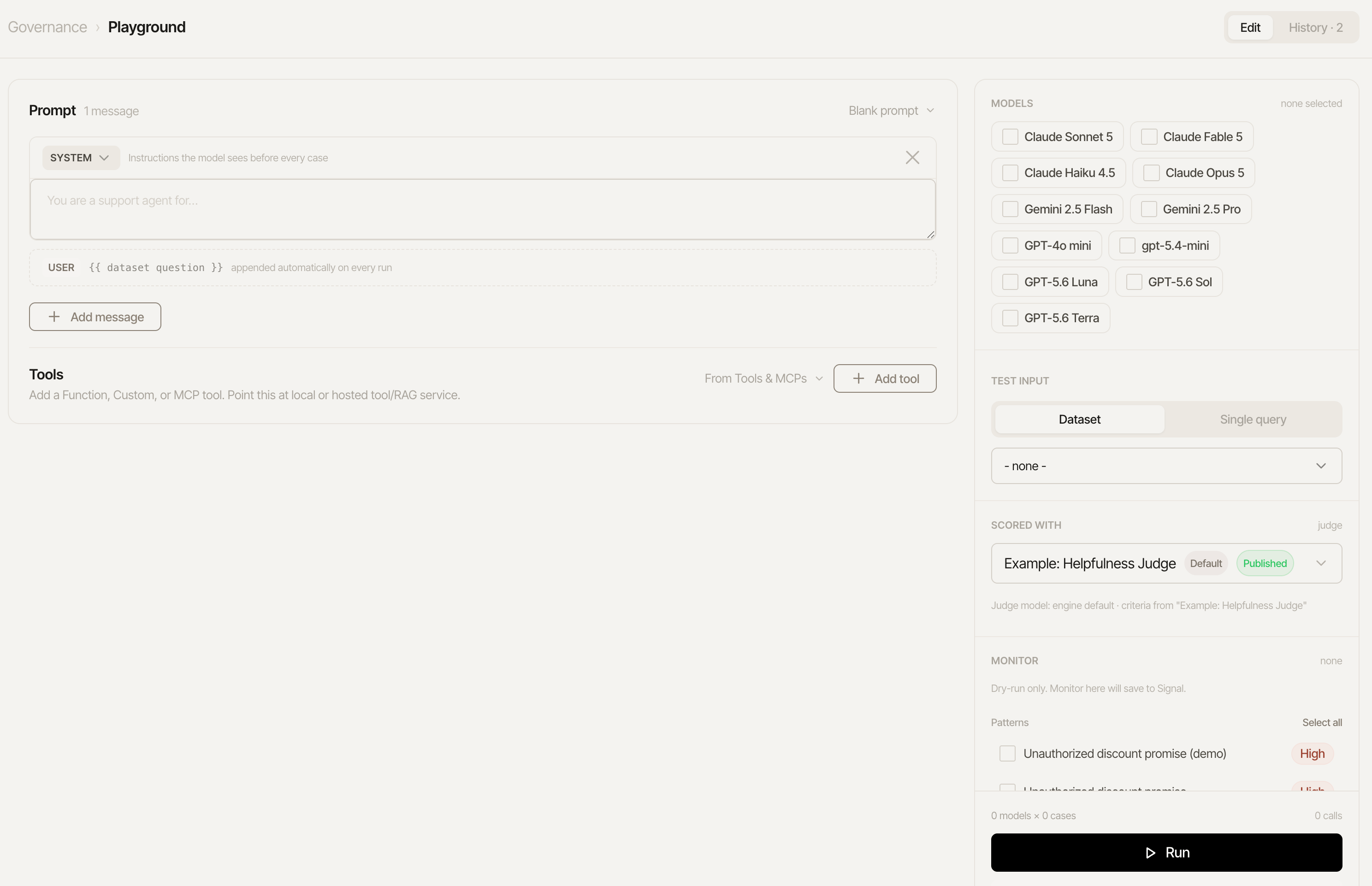 Before committing to a full dataset run, test a prompt against real models and real test cases interactively - modeled on Braintrust's and OpenAI's own playgrounds. Governance → **Playground**, its own top-level tab:
* Edit a multi-turn prompt - system message, optional few-shot user/assistant example turns - freely, or load a saved [Prompt Registry](/improve/prompt-management) version as a starting point.
* Select one or more OpenAI, Anthropic, and/or Gemini models, from the same dashboard-managed model catalog [Model portability](/evaluation/model-portability) uses.
* Pick an existing dataset and check which of its questions to include.
* **Run grid** fires the whole (question × model) grid for real - each cell independently shows the actual output, latency, tokens, and estimated cost, plus a judge rating whenever that question has an expected answer, and each of the dataset's enabled [code scorers'](/evaluation/code-scorers) results alongside it. At most 4 cells run at once (a fixed concurrency cap, so a large grid doesn't trip your provider's rate limits) - the rest queue and fill in as earlier ones finish.
Playground is a scratchpad with a memory: nothing here creates a real eval run or saves a
prompt version on its own, but the last runs are kept in **History** (breadcrumb toggle, Runs |
Simulations) so a refresh doesn't lose your grid, and past simulations reopen with their full
transcript. Copy a result you like into a saved Prompt or a real dataset run once you're happy
with it.
## Tools
The Playground tests prompt and tools together. Add a tool ad hoc, or pull one straight from the [Tool Schemas registry](/improve/tool-schemas) with the **From Tool Schemas** picker - name, description, and parameter schema come in as the registry's current published version.
The endpoint URL is **optional**:
* **Blank (simulated)**: the tool is still sent to the model, and its calls return a canned `{simulated: true}` result - so whether the prompt/model *choose* the tool and *form valid arguments* is fully testable with zero infrastructure. The cell's tool-call trace shows the arguments and marks the result simulated, so nothing pretends to be a real lookup.
* **Set**: each call POSTs `{tool, arguments}` to your real service and feeds the actual response back to the model - the full loop, including how the prompt handles real tool outputs.
## Beyond single answers
The grid tests single-shot answers. [Simulate conversation](/evaluation/simulate-conversation)
tests multi-turn behavior with a persona-driven simulated user, and
[Model portability](/evaluation/model-portability) replays any captured trace against
alternative models for a cost/latency/quality comparison.
Before committing to a full dataset run, test a prompt against real models and real test cases interactively - modeled on Braintrust's and OpenAI's own playgrounds. Governance → **Playground**, its own top-level tab:
* Edit a multi-turn prompt - system message, optional few-shot user/assistant example turns - freely, or load a saved [Prompt Registry](/improve/prompt-management) version as a starting point.
* Select one or more OpenAI, Anthropic, and/or Gemini models, from the same dashboard-managed model catalog [Model portability](/evaluation/model-portability) uses.
* Pick an existing dataset and check which of its questions to include.
* **Run grid** fires the whole (question × model) grid for real - each cell independently shows the actual output, latency, tokens, and estimated cost, plus a judge rating whenever that question has an expected answer, and each of the dataset's enabled [code scorers'](/evaluation/code-scorers) results alongside it. At most 4 cells run at once (a fixed concurrency cap, so a large grid doesn't trip your provider's rate limits) - the rest queue and fill in as earlier ones finish.
Playground is a scratchpad with a memory: nothing here creates a real eval run or saves a
prompt version on its own, but the last runs are kept in **History** (breadcrumb toggle, Runs |
Simulations) so a refresh doesn't lose your grid, and past simulations reopen with their full
transcript. Copy a result you like into a saved Prompt or a real dataset run once you're happy
with it.
## Tools
The Playground tests prompt and tools together. Add a tool ad hoc, or pull one straight from the [Tool Schemas registry](/improve/tool-schemas) with the **From Tool Schemas** picker - name, description, and parameter schema come in as the registry's current published version.
The endpoint URL is **optional**:
* **Blank (simulated)**: the tool is still sent to the model, and its calls return a canned `{simulated: true}` result - so whether the prompt/model *choose* the tool and *form valid arguments* is fully testable with zero infrastructure. The cell's tool-call trace shows the arguments and marks the result simulated, so nothing pretends to be a real lookup.
* **Set**: each call POSTs `{tool, arguments}` to your real service and feeds the actual response back to the model - the full loop, including how the prompt handles real tool outputs.
## Beyond single answers
The grid tests single-shot answers. [Simulate conversation](/evaluation/simulate-conversation)
tests multi-turn behavior with a persona-driven simulated user, and
[Model portability](/evaluation/model-portability) replays any captured trace against
alternative models for a cost/latency/quality comparison.